
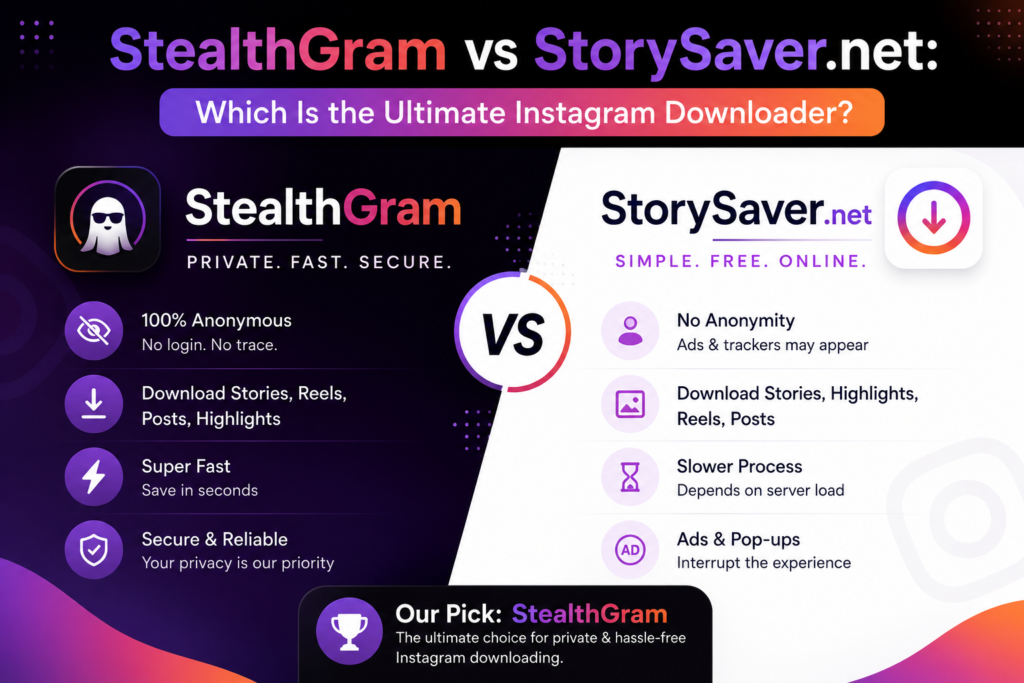

The demand for third-party media downloaders has grown exponentially as social media platforms tighten their restrictions on content saving. Instagram, by design, does not provide a native button to download Stories, Reels, or highlights directly to your device’s local storage. While this privacy architecture protects the platform’s ecosystem, it creates a massive challenge for content creators, social media researchers, and casual users who want to archive media for offline use.
To solve this problem, dozens of web-based utilities have surfaced across the internet. Among the pool of available options, two names frequently appear in search trends: StealthGram and StorySaver.net. Both platforms promise to bridge the gap between public social data and your local downloads folder.
However, they approach user privacy, interface design, and backend processing in completely different ways. In this comprehensive comparison, we will analyze the speed, safety, ad density, and anonymity features of both web tools to determine which platform is truly the ultimate downloader.
The Core Philosophy: General Utility vs. Targeted Privacy
Before diving into the technical performance metrics, it is vital to understand the structural philosophy behind each of these online tools.
StorySaver.net is one of the oldest web-running tools in the media extraction space. Its main objective is purely transactional: you provide a link or a username, and it fetches the corresponding media file. It treats the extraction process purely as a media downloading task, without placing a heavy emphasis on user-experience layers or modern data masking.
On the other side of the ring stands StealthGram. This tool was engineered from the ground up with a double-layered priority system: absolute user anonymity combined with seamless media archiving. Instead of just grabbing a file link, StealthGram acts as an invisible visual buffer. It allows users to search, safely preview active grids, and selectively archive media without ever leaving a trace on Meta’s tracking servers.
Interface Design and User Experience (UX)
The user interface is often the first place where online utilities succeed or fail. Since most users access these sites on mobile web browsers, a cluttered layout can ruin the entire experience.
The StorySaver.net Experience
When you land on StorySaver.net, the first thing you notice is the heavy reliance on traditional web monetization models. The page is frequently packed with aggressive display advertisements, automatic video pop-ups, and misleading download buttons. These ads often mimic the actual system interface, tricks users into clicking unwanted links, and can severely slow down your mobile browser’s rendering speed.
The StealthGram Experience
In stark contrast, StealthGram utilizes a clean, modern, and highly minimalist web dashboard. The design focuses entirely on functionality. There are no overwhelming script redirects or deceptive ad units crowding the main search console. The clean layout ensures that the page loads almost instantly, even on slower 3G or 4G mobile networks, providing a premium feel that is rare for free web utilities.
Feature Showdown: Processing Capabilities
To find out which tool takes the crown, we must look at how they perform when executing everyday media requests.
| Evaluation Metric | StorySaver.net | StealthGram Platform |
| Active Story Downloads | Supported (Requires Captcha) | Supported (Instant Fetch) |
| Account Logins Required | No | No |
| User Interface Cleanliness | Low (Heavy ad placements) | High (Minimalist & Fast) |
| Anonymity Guarantee | Basic extraction | Advanced cloud proxy buffer |
| HD Video Preservation | Variable compression | 100% Native Resolution |
As shown above, while both systems successfully fetch the target public media files, StealthGram streamlines the process by removing frustrating operational hurdles like anti-bot captchas and intrusive script delays.
Anonymity and Backend Security Protocols
For majority of privacy seekers, the ultimate goal isn’t just getting the file—it is making sure nobody knows they obtained it.
StorySaver.net handles requests using standard web scraping methodologies. While it does not require you to log into your personal profile, its basic processing framework can sometimes leak data footprints through standard browser referrers if your device parameters are exposed.
This is where the advanced infrastructure of StealthGram establishes its dominance. The tool functions via a dedicated cloud proxy routing network. When you search for an active account using StealthGram, the system isolates your local IP address entirely. The request received by the target account looks like a routine automated server ping from an unlinked web hub. Because your device never makes direct contact with the social platform’s live database, your primary profile remains completely invisible and insulated from tracking algorithms.
Media Quality and Compression Control
There is nothing more frustrating than downloading a beautiful, high-definition video only to find out the downloaded file is a blurry, pixelated mess. Many older web downloaders forcefully compress video bitrates to save on monthly server bandwidth costs.
StorySaver.net occasionally suffers from quality drops, especially during peak traffic hours when their media nodes are overloaded. Videos can lose their crispness, and photos are often downscaled to lower web-resolutions.
StealthGram solves this network issue by fetching the uncompressed, raw source data straight from the live database infrastructure. If a brand or content creator uploads a high-end 1080p video loop or a crisp photo sequence, the tool preserves that exact file layout. You get the original asset file with no quality degradation, making it an essential platform for professional social media managers, media editors, and brand strategists who need high-fidelity creative mockups.
Step-by-Step Execution: Which Tool is Faster?
Let’s look at the actual workflow required to pull a public story archive using both platforms.
Using StorySaver.net:
- Navigate to the website.
- Enter the target username into the text entry box.
- Click the download button and wait for the page to reload.
- Complete the automated “I am not a robot” captcha check box.
- Scroll down past several ad blocks to find the media list and click save.
Using StealthGram:
- Open the clean StealthGram web portal on any browser.
- Type or paste the clean public profile username into the main search console.
- Hit enter to let the cloud proxy load the live feed instantly.
- Preview the active content grid and click the direct download button below your chosen media file.
By removing the captcha check step and eliminating page reloads, StealthGram cuts the overall extraction time in half.
The Verdict: Which Is the Ultimate Downloader?
While StorySaver.net deserves recognition for being a long-standing tool in the digital ecosystem, its outdated interface, heavy ad intrusion, and sluggish download process make it difficult to recommend to modern users who value efficiency and privacy.
StealthGram wins this battle across every single metric. It provides a safer, faster, and completely ad-optimized experience that prioritizes user anonymity above everything else. By removing complicated captchas and keeping media downloads at their native high-definition quality, it establishes itself as the definitive, ultimate media downloader for modern social web browsing.







Pingback: Why Does StealthGram Say "No Active Stories Found"? (Fix)
Pingback: How to View Instagram Stories Without an Account: Best Methods
Pingback: Anonymous Market Research Guide with StealthGram