
Smartphones have become the central hub for our personal and professional lives. We use them to manage bank accounts, communicate with clients, and store private memories. When users want to research social media content anonymously, their first instinct is often to download a free utility app from an app store. These apps promise quick access and seamless viewing without leaving a trace on the target profile.
However, a massive security issue known as permission creep threatens your device data. Understanding this digital threat reveals why installing software locally is highly risky. Choosing a web-based service over a downloadable application is the easiest way to safeguard your personal space.
What Exactly Is App Permission Creep?
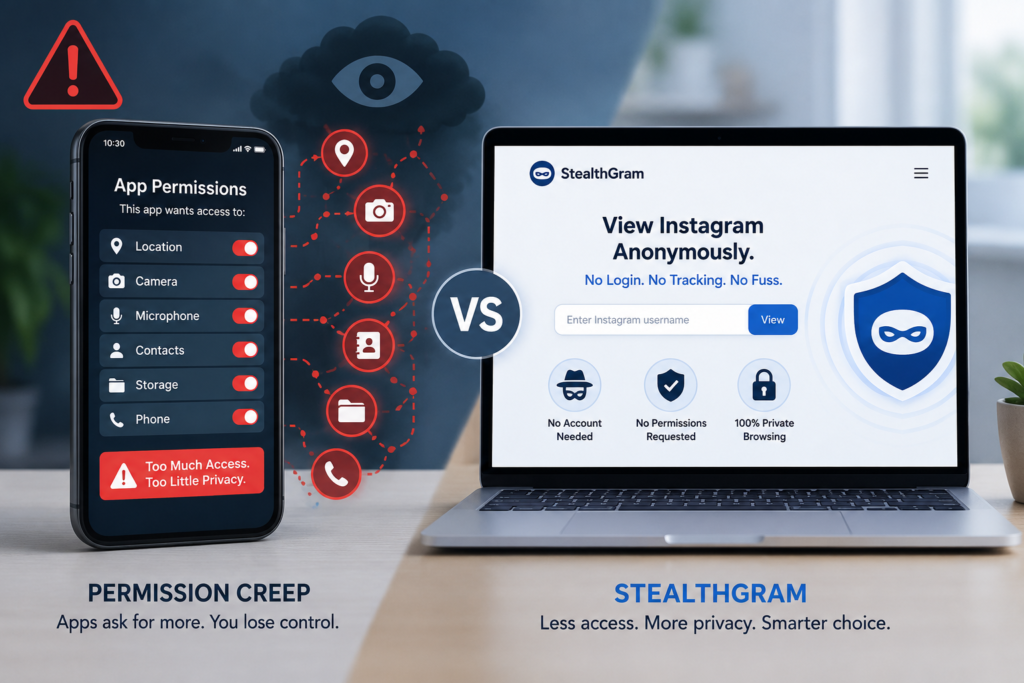
Permission creep happens when a software application slowly requests more access to your device features than it actually needs to perform its job. When you first install a basic social media utility, it might only ask for network access. This request makes sense because the tool needs an internet connection to fetch public data assets.
Over time, developers release routine updates that silently introduce new permission requests. Suddenly, the app asks for access to your local storage, your precise GPS location, or your device microphone. Many users click “Accept” automatically without reading the prompt because they want to use the tool quickly. This creates a permanent backdoor into your operating system that remains open even when you close the app screen.
The True Cost of Free Mobile Utilities
Developing, updating, and maintaining software apps requires considerable financial resources. When a developer offers a utility app completely for free, they must find alternative ways to monetize their operation. Most of these free tools generate revenue by collecting your background user data and selling it to advertising networks.
Your Private Files Are at Risk
Once a utility app gains access to your smartphone storage, it can read your local media files. This means your private photographs, documents, and business graphics are potentially exposed to third-party scripts. Many of these apps contain embedded tracking code that records your device model, network provider, and app usage habits. This constant data collection drains your battery power and compromises your overall device infrastructure.
How StealthGram Eliminates Local Security Vulnerabilities
Web-based utilities approach data security from a completely different perspective. Instead of forcing you to download local code onto your phone chips, a service like StealthGram operates entirely on secure cloud servers. You never have to visit an app store or download a package file to utilize its features.
When you navigate to StealthGram, the system requests zero device permissions. It does not need access to your photo gallery, your contact lists, or your location parameters. The entire utility runs inside the native container of your web browser. This means StealthGram cannot touch your private files or monitor your background activities. It keeps your personal hardware entirely safe from the reach of data brokers.
The Hidden Mechanics of App-Based Tracking
When you open a mobile app to view a public social profile, the app sends a direct request from your specific IP address. Even if you are not logged into your personal profile, the app can still link your search habits to your physical phone hardware. This is done through a tracking method called device fingerprinting.
| Security Risk Factor | Downloadable Mobile Apps | Web Utilities (StealthGram) |
| Storage Permissions | Requires direct access to read/write local files | Requires zero local file access |
| Background Trailing | Continuously runs scripts in the background | Shuts down completely when the tab is closed |
| Device Fingerprinting | Collects hardware serial numbers and IMEI data | Obscures device details via cloud processing |
| System Overhead | Drains battery and occupies internal RAM | Uses normal browser resources with no lag |
Why Cloud Architecture Provides Absolute Protection
The primary technical reason web tools are superior involves where the data processing actually happens. A standard application forces your local phone processor to handle the tracking scripts embedded within social networks. This exposes your device to tracking cookies and advanced network logs.
Using StealthGram completely changes this interaction framework. The cloud infrastructure of StealthGram acts as a protective shield between your browser and the target data network. When you search for a public user profile, the request is processed on a remote cloud sandbox server. The social media platform only sees the request coming from StealthGram, which completely hides your identity.
This clean architectural approach is just as critical as choosing a dependable link building platform for your digital business expansion plans. You always want to use modern methodologies that prevent external tracking networks from mapping your operational strategies. Implementing safe browser tools like StealthGram ensures your research remains unlinked to your real-world corporate identity.
No Sign-Ups, No Digital Footprint
Another major manifestation of permission creep is the forced creation of user accounts. Many mobile utilities refuse to work until you register with an email address or connect a secondary social profile. This requirement completely destroys your anonymity from day one. If the app database suffers a security leak, your real-world credentials become public knowledge.
The structural design of StealthGram requires no profiles, no passwords, and no login inputs. You simply visit the webpage, perform your quick research task, and leave. Because StealthGram does not save user data archives, there is no personal data to leak or sell. This transactional approach gives you absolute peace of mind during sensitive market research campaigns.
Managing Your Local History Easily
When you install a mobile application, it creates persistent cache folders deep within your phone’s memory. This leaves a permanent digital trail on your physical hardware that is difficult to erase completely. Anyone who holds your unlocked phone can see exactly what research you have been conducting.
With a web utility, maintaining local privacy requires very little effort. You can access StealthGram inside a standard incognito browsing window. The moment your research is done and you close that tab, your local history is completely erased by the browser. Utilizing StealthGram ensures your phone screen and internal storage remain completely free of suspicious cache footprints.
Selecting clean operational tools is just as important as implementing high-quality backlink strategies for your website portfolio. Both practices require a focus on clean execution and minimal risk to your digital properties.
Final Thoughts: Switch to Web Isolation
Mobile app permission creep is a silent threat that turns basic utility tools into dangerous data harvesting programs. They demand unnecessary access to your device hardware, monitor your actions in the background, and create massive security liabilities.
Web-based platforms offer the only logical solution to this growing privacy problem. Utilizing a dedicated web service like StealthGram allows you to conduct your competitive analysis without installing untrusted code on your smartphone. It removes the need for local data access, cuts out account registration forms, and blocks background device tracking. By making StealthGram your primary public viewer, you protect your personal smartphone data while enjoying a fast, clean, and truly anonymous browsing experience every day.






Pingback: Pablo Huston The Legacy of Hollywood Royalty