
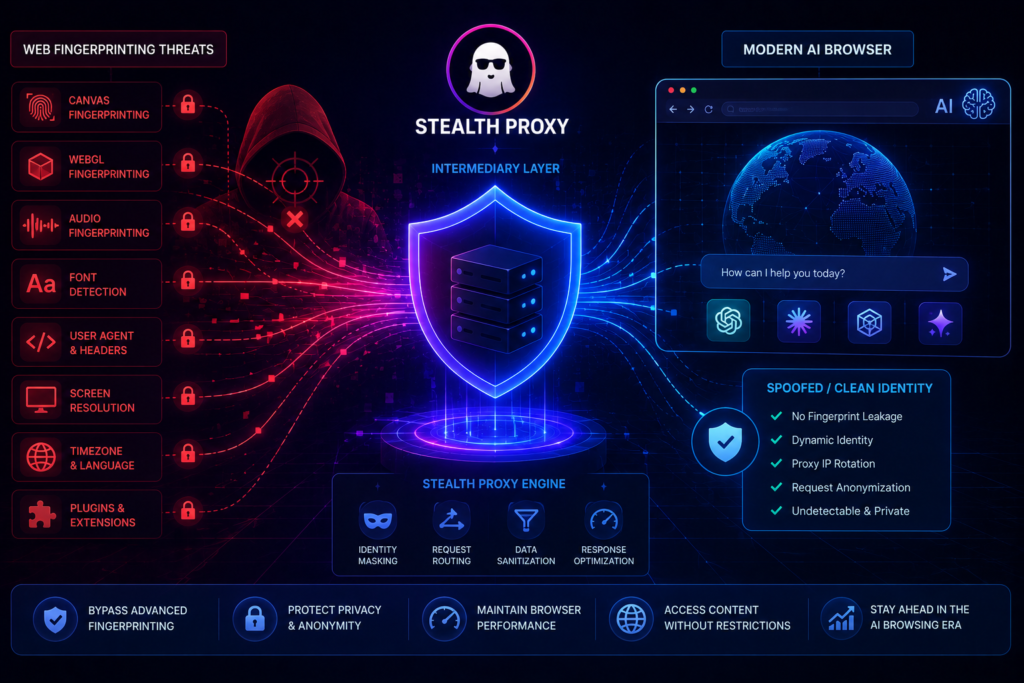

Protecting your online privacy has become a huge challenge today. For digital publishers, content creators, and remote teams, keeping business data safe is now a top priority. When you do deep market research or check competitor layouts, using StealthGram inside your daily workflow provides a secure cloud shield. It acts like a remote buffer between your device and the websites you visit. This web-based utility makes sure that no tracking system can log your private network data.
However, modern websites do not just track you with simple cookies anymore. Advanced platforms now use smart AI tracking tools to build a unique profile of your device. Every time you view a public profile or check online media grids, background scripts inspect your browser settings to identify you.
Fortunately, you can stop this invasive tracking without breaking your daily workflow. Moving your market research over to a secure cloud platform allows you to gather visual insights safely. This setup keeps your system hidden, so trackers can never record your local browser specifications.
What is Web Fingerprinting and How Does It Track You?
Many people believe that clearing their browser history or opening an incognito tab keeps them anonymous. Unfortunately, this is a big misunderstanding. Modern tracking scripts check hundreds of small hardware details on your laptop or phone to create a permanent digital identity.
AI-driven tracking systems look at several specific tech parts to profile your machine:
1. Hardware Graphics and Canvas Rendering
Every single computer graphics chip processes visual pixels slightly differently due to small factory variations. Tracker scripts exploit this by making your browser draw a hidden image in the background. They measure the tiny changes in how the pixels render to create a unique tracking number for your device. Opening links through StealthGram stops this attack because the image rendering happens entirely on a distant cloud server instead of your local machine.
2. Audio Processing and Driver Signatures
Websites can also check your system’s sound card by playing short, completely silent audio waves through your browser. The specific way your audio drivers process these sound frequencies creates a clear, unchangeable signature. Because every device model handles sound differently, this works like a fingerprint. Using a cloud proxy protects you because your local audio card is never used when displaying the web layout.
3. Installed Font Lists and System Scans
When you visit a page, tracking scripts scan your computer directory to see which fonts you have installed. Since designers, web editors, and developers install different font packages, your exact font list becomes a highly specific identifier. If you route your queries through StealthGram, the tracking tools can only see the standard font list of the cloud server, hiding your real identity.
Why Cloud Script Isolation is Better Than Normal Browsing
The most reliable way to protect your business from advanced device tracking is to separate your device from the website servers. Shifting your competitive research over to the cloud layer of StealthGram builds an immediate security wall around your hardware assets.
The main benefit here is server-side document rendering. When you paste a link into the cloud search bar, the website handshake happens on a distant enterprise node. The cloud node loads the target page, strips out all tracking scripts, and converts the media into a clean, flat layout frame before sending it to your device. This means your computer never downloads raw tracking codes, allowing StealthGram to keep your real digital identity clean and secure.
📊 Quick Comparison of Online Security Methods
| Browsing Method | Fingerprint Risk | Local System Load | Hardware Data Exposure |
| Normal Tab Browsing | Extremely High | Standard Load | Fully Exposed to Scripts |
| Downloadable Mobile Apps | High Risk | Heavy Cache Storage | High via App Permissions |
| StealthGram Cloud Mask | Zero Risk | Very Low Load | Hidden Behind Cloud Profile |
2 Simple Tweaks to Fix Browser Freezes and Speed Up Loading
If you ever see a blank page or a loading loop while using your remote proxy portal, your local browser settings are likely causing a data jam. Web property owners can easily fix these rendering bugs with these two quick steps:
Enable Standard Graphics Core Acceleration
Modern internet browsers use your device’s graphics card to load complex web media efficiently. However, if your system drivers have a small software bug, the cloud rendering window might freeze or fail to display images. Go into your browser settings menu, find the performance section, and turn on hardware acceleration. Making this quick adjustment allows StealthGram data components to render smoothly using your system’s core processing units.
Clear a Fragmented Document Buffer Cache
Every time you open an interactive web app, your computer saves tiny cache tokens to help the site load faster next time. If these files get corrupted during a sudden network drop, your rendering engine will fail to process new incoming data. Open your browser privacy panel, click “Clear Browsing Data,” and wipe out your temporary site files. Cleaning this space allows StealthGram visual grids to populate instantly without layout crashes.
Keeping Your Business Hardware Fast and Fast
Using a web-based script utility instead of downloading a native application is a smart way to protect your hardware and keep your system fast. Downloadable third-party programs often include background tracking processes that harvest your device information, fill your storage with temporary files, and slow down your processor over time.
By running your competitor research through StealthGram, you keep your local computer registry clean and fully optimized. Media agencies and freelancers can easily monitor current visual trends, study viral content hooks, and build secure swipe files inside a single browser tab without cluttering device memory or risking data leaks.
Final Thoughts
Shielding your browser fingerprint from invasive tracking networks should never mean dealing with slow internet speeds or downloading risky applications. While normal browsing methods expose your corporate network to deep tracking and data collection, secure cloud-isolated web proxies offer a fast and safe alternative. By integrating the optimized script-filtering features of StealthGram into your creative routine, you can easily gather marketing data, bypass strict login gates, and keep your business market research completely confidential.





Pingback: StealthGram Architecture: Smart Cloud Sandbox Defense
Pingback: 5 Best Anonymous Instagram Story Viewers in 2026 (Safe Tools)
Pingback: How to View Public Instagram Highlights Without Logging In
Pingback: StealthGram: How to Stop Heavy Social Scripts From Freezing Your Mobile Browser - Anonymous Insta Story Viewer & Downloader